Overview
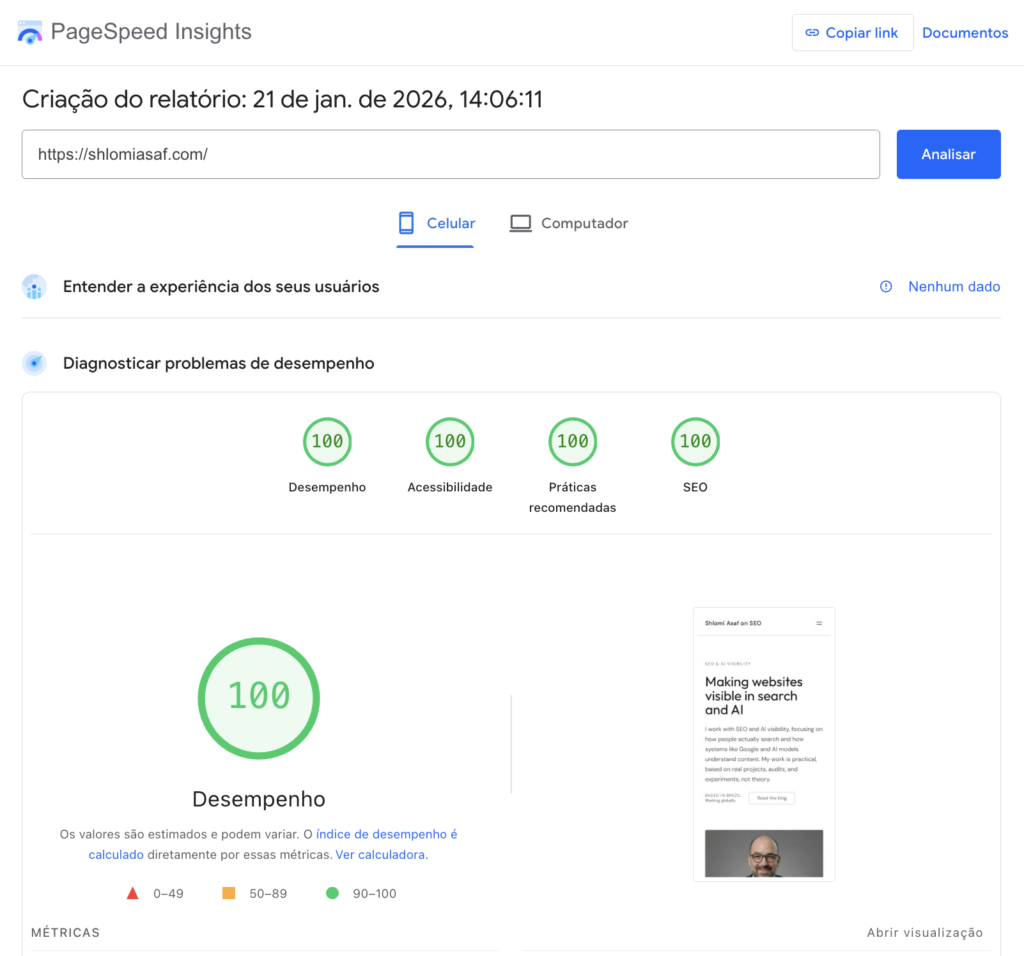
This article documents a practical approach to building WordPress sites that achieve consistently high Lighthouse performance scores. It is based on a real production site that reached a score of 100 across all Lighthouse categories, without using heavy page builders, aggressive optimizations, or fragile configurations.
The focus here is not on chasing scores, but on the concrete decisions that lead to predictable performance: theme choice, plugin selection, JavaScript loading behavior, caching strategy, and knowing when not to optimize.
The score
Why Lighthouse Scores Improve
Lighthouse scores improve when the browser can parse, render, and execute a page with minimal friction.
In practice, this comes down to a few factors:
- Simple, predictable HTML output
- Limited JavaScript execution during initial render
- Stable layout with minimal shifts
- Controlled third-party scripts
When these conditions are met, Lighthouse scores tend to follow without targeted tuning.
Initial Decisions When Starting a Project
Before configuring cache or running performance audits, three questions are addressed:
- What type of site is being built?
- How complex does the design need to be?
- Is a page builder required for the design to function?
For most content-driven sites, blogs, and marketing pages, a page builder is not required.
Page Builders and Performance Trade-offs
Page builders such as Elementor and Divi enable rapid development of complex layouts. However, they introduce measurable performance costs:
- Deep DOM trees with multiple wrapper elements
- JavaScript executed globally across pages
- Additional third-party dependencies
- Increased likelihood of CLS and long tasks
When design requirements allow it, native block-based themes produce simpler markup and more predictable rendering behavior.
Case Study: Sabores de Israel

The sabores de israel site was built using a WordPress core block theme (Twenty Twenty-Four).
All layout and design adjustments were implemented using core blocks and custom CSS within the theme. No page builder was used.
The site includes image-heavy content, but image loading behavior is controlled explicitly. The resulting structure remains shallow and predictable, which contributes directly to stable performance metrics.
More about the project, can be found here.
Theme Selection
Working with a feature-rich, ready-made theme is a valid option, and in some projects it can save time. However, when the goal is full control over performance characteristics, native block-based themes provide a clearer foundation.
When a core theme is not suitable, the following themes provide a balance between flexibility and performance:
These themes share common characteristics: lightweight output, block editor compatibility, and minimal enforced dependencies.
The key difference is in how flexibility is achieved. Instead of relying on a heavy theme framework, I prefer starting with a native or lightweight block theme and extending functionality through carefully chosen block plugins. In many cases, I prefer to write the required extensions myself, which gives me full control over the CSS and avoids unnecessary abstractions. When a project requires more advanced or custom layouts, using a block collection plugin is a reasonable choice—as long as it is performance-oriented and does not introduce unnecessary JavaScript or global assets. This keeps the rendering layer simple while allowing incremental customization without losing control over assets and execution behavior.
Blocks collections I recommend:
- Kadence Blocks
- Spectra Blocks (astra)
Hosting and Server Stack
The site does not rely on specialized infrastructure.
- Hosting: Hostinger (shared hosting)
- Web server: LiteSpeed
- Cache plugin: LiteSpeed Cache
- Object cache: Memcached
- CDN: Hostinger CDN
This configuration provides low TTFB and stable behavior without requiring a VPS or dedicated server.
Caching Strategy
Caching is applied conservatively.
Page cache and object cache are enabled to reduce repeated computation. No aggressive script combination or forced optimization is used to compensate for structural issues.
Caching improves an already stable setup; it does not correct architectural problems.
JavaScript Loading Strategy
No jQuery is loaded on the site.
This is not a stylistic decision. In modern FSE-based WordPress sites, jQuery is not loaded by default. Any appearance of jQuery indicates an explicit dependency introduced by a theme or plugin.
Before adding a plugin, network requests are inspected to verify:
- Which scripts are loaded
- Whether they load globally
- Which dependencies they introduce
When a plugin provides a single required feature but introduces broad dependencies, a small custom plugin is often implemented instead.
Lighthouse Results
On mobile Lighthouse tests:
- Performance: 100
- Accessibility: 100
- Best Practices: 100
- SEO: 100
These results reflect controlled JavaScript execution, stable layout, and predictable rendering behavior.
Google Tag Manager and Lighthouse
Adding Google Tag Manager reduced the Lighthouse performance score from 100 to approximately 85, primarily due to main thread activity and LCP impact.
Initial attempts to delay JavaScript execution using LiteSpeed’s delay mechanism caused UI issues, including a broken mobile menu.
Cause
LiteSpeed’s JavaScript delay operates as a global execution layer. Even scripts marked as deferred may execute too late when delay is enabled, leading to race conditions with UI-critical scripts.
Resolution
The following configuration proved stable:
- Delay JS Execution: OFF
- Load JS Deferred: ON
This preserves execution order while preventing render-blocking behavior from analytics scripts.
Common Issues Observed
- Default use of page builders without design necessity
- Overlapping optimization plugins
- Aggressive minification and script combination
- Uncontrolled third-party scripts
- Optimizing for Lighthouse instead of structure
Lighthouse Scores in Context
A Lighthouse score of 100 is not required for search performance.
Sites with scores in the 80–90 range routinely rank well. Content relevance, authority signals, and usability remain primary ranking factors.
The purpose of this article is to document a repeatable process that makes high scores achievable when they are appropriate for the project.
Conclusion
High Lighthouse scores emerge from structural simplicity and controlled execution.
When markup is clean, dependencies are limited, and JavaScript execution is predictable, performance metrics improve without targeted tuning.
Lighthouse reflects these conditions. It does not create them.
Leave a Reply